
How to set up an IRS payment plan, step by step
Short answer
To set up an IRS payment plan, first make sure every required return is filed, then apply through the Online Payment Agreement tool in your IRS Online Account. Online applicants learn right away whether the plan is approved. If you owe more than $50,000, run a business, or cannot use the online tool, apply by phone, in person or with Form 9465 by mail, which usually takes about 30 days.
- 01Fastest method
- Online, with an on-screen approval decision
- 02Online tool hours
- 5 a.m. to midnight Eastern, daily
- 03Paper request
- Form 9465, answered in about 30 days
- 04Needed first
- All required tax returns filed
Before you set up an IRS payment plan
Knowing how to set up an IRS payment plan is mostly about preparation. The application itself takes minutes online, but it fails if a return is missing, if the balance is not on your account yet, or if the monthly amount you offer is below what the IRS will accept.
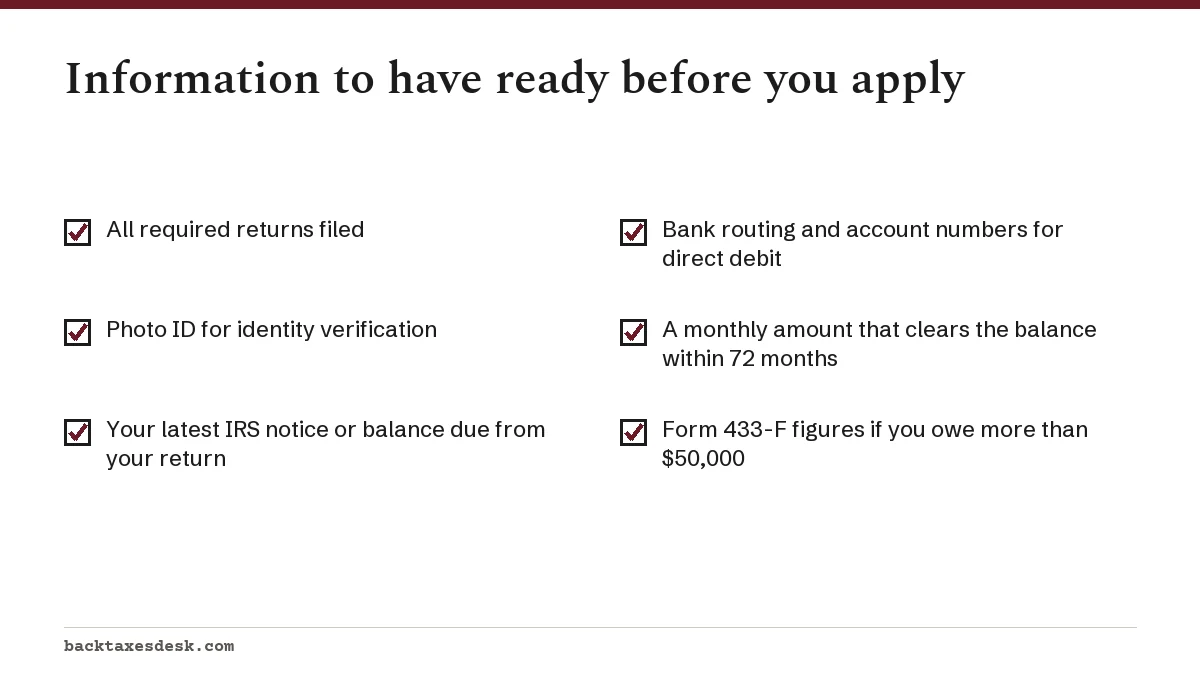
- File every required return. Individuals must be current on filing to get an installment agreement. If a year is missing, file it before you apply, even if you cannot pay that year's tax.
- Confirm the balance. Your IRS Online Account shows the amount owed by tax year. If you just filed and have not received a bill, use the balance due shown on your return.
- Pick a plan type. Under $100,000 and payable within 180 days points to a short-term plan. Otherwise you need a monthly installment agreement.
- Work out a monthly amount you can keep paying. For a streamlined plan it must clear the assessed balance within 72 months. On $24,000, that means at least $333.34 a month.
- Choose a payment day. The IRS lets you pick any day from the 1st to the 28th; choose one a few days after your paycheck lands so the payment never bounces.
Worked example: which plan to request
Say your 2026 return shows $8,000 due and you can set aside $1,500 a month. You would clear it in about six months, so ask for the short-term plan: no setup fee, and no fixed schedule to default on. If you could only manage $400 a month, the payoff would take about 20 months, so you need a monthly installment agreement, which costs $29 online with direct debit.
If your adjusted gross income is at or below 250% of the federal poverty guidelines, the IRS treats you as low-income. The direct debit setup fee is then waived, and the $43 fee for other payment methods may be reimbursed once the plan is completed under the IRS conditions. The test uses your adjusted gross income for the most recent tax year the IRS has on file.
How to set up an IRS payment plan online
Applying online is the fastest and cheapest way to set up a tax payment plan with the IRS. The Online Payment Agreement tool is available to individuals, including sole proprietors and independent contractors, who owe $50,000 or less for a long-term plan or under $100,000 for a short-term plan.
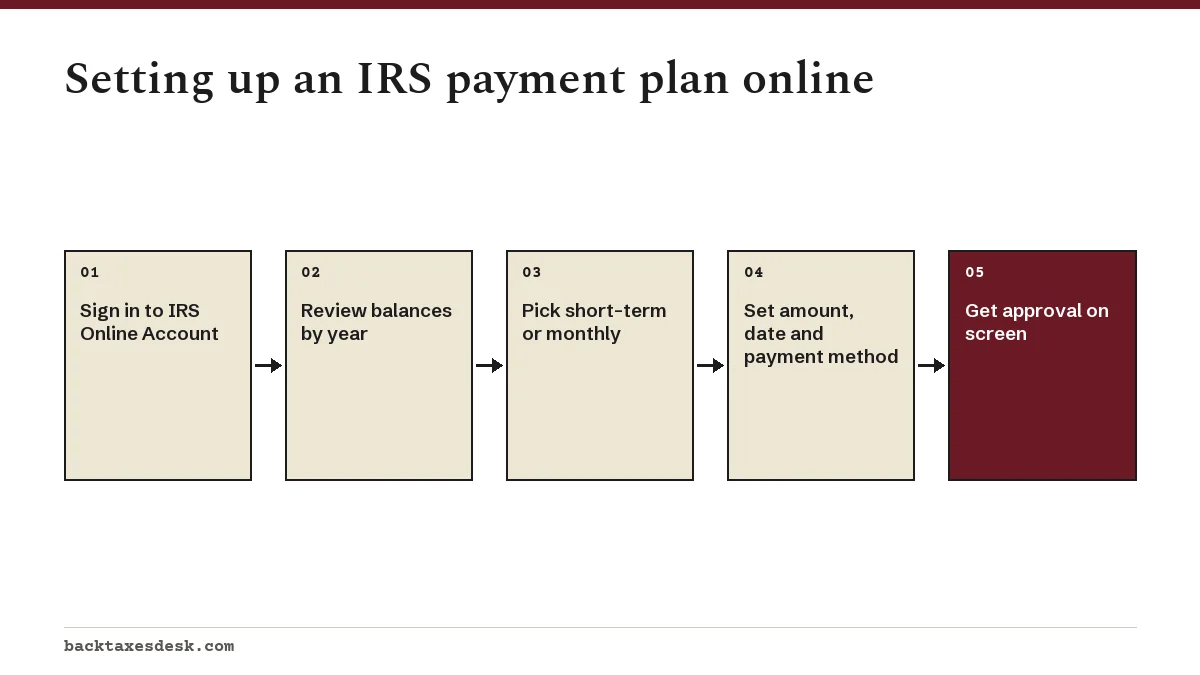
- Go to the Online Payment Agreement page on IRS.gov and sign in to your IRS Online Account. First-time users create the account and verify identity with a photo ID.
- Review the balances the tool shows. If a recently filed return is not listed, enter the balance due from that return when asked.
- Choose short-term (180 days or less) or a monthly plan.
- For a monthly plan, enter your payment amount and the day of the month you want to pay.
- Choose how you will pay. Direct debit from a bank account costs $29; other payment methods cost $69.
- Submit. The tool tells you immediately whether the plan is approved. Save or print the confirmation page.
A closer look at the tool, including how to revise a plan later, is on our Online Payment Agreement page.
How to revise an IRS payment plan online
You can revise an IRS payment plan online whenever the original terms no longer fit. A raise might let you pay more and finish sooner; a job loss might mean asking for a smaller payment. Either way, fix it before you miss a month, not after.
- Sign in to the Online Payment Agreement tool with your IRS Online Account.
- Open your existing plan and choose to revise it.
- Enter the new monthly amount, a new due date, or both. For a streamlined plan, the new amount still has to clear the balance within 72 months.
- To switch to automatic payments, choose direct debit and enter your routing and account numbers.
- Confirm the change and pay the $6 revision fee if one applies. Save the confirmation.
Example: lowering a payment
Suppose you owe $18,000 and have been paying $600 a month. Dropping to $300 would still clear the balance in 60 months before interest, inside the 72-month limit, so the tool can accept it. Dropping to $200 would take 90 months, which falls outside a streamlined plan and pushes you to the phone and a financial statement.
IRS online payment agreement login and identity verification
The OPA login runs through your IRS Online Account. First-time users create that account and prove their identity with a photo ID; after that, the same sign-in reaches your balance, payment history and payment plan. There is no separate username for the payment plan tool.
- Tool will not open: check the time. The application is available only from 5 a.m. to midnight Eastern.
- Identity check fails: make sure the name on your photo ID matches your tax records, and use a phone that can receive the verification code.
- Signed in, but no balance shows: if you filed recently and have no bill yet, the tool asks for the balance due from your return.
- Signed in, but blocked from applying: usually a missing return, a balance over the limit, or a business account.
If you cannot get past identity verification at all, you can still apply by phone or with Form 9465. Our Form 9465 instructions explain the paper request line by line.
When you have to apply offline instead
The online tool covers the simple cases. Anything that needs a human decision, such as a large balance or a payment below the streamlined minimum, goes through the phone, a Taxpayer Assistance Center or the mail.
- You owe more than $50,000 and need a monthly plan.
- You are applying for a business account.
- You cannot afford the minimum payment the tool requires.
- You want a partial payment installment agreement, which requires a financial statement.
For a comparison of every route, including fees and timing, see how to set up an IRS payment plan. The wider picture of plan types and costs is in our IRS payment plan guide.
How to set up an IRS payment plan by phone or in person
Use the phone when the online tool will not take your case: a balance over $50,000, a business account, or a monthly amount too low for the tool to accept. Call the number printed on your most recent IRS notice; if you have no notice, IRS.gov's payment plan page lists the individual line. You can also book an appointment at a Taxpayer Assistance Center.
Have your notice, your last filed return and your bank details in front of you. If you owe more than $50,000, expect the IRS to ask about income, living expenses and assets, often using Form 433-F, Collection Information Statement. Our walkthrough of Form 433-F shows how each line is filled in.
Setup fees are higher by phone or in person: $107 with direct debit and $178 with other payments. A short-term plan remains free however you request it.
Applying by mail with Form 9465
Form 9465, Installment Agreement Request, is the paper route. You can attach it to the front of your tax return when you file, or send it alone to the IRS address for your state. Do not use it if you can pay in full within 180 days or if you prefer to apply online.
- Balance over $50,000: attach Form 433-F.
- Balance of $25,001 to $50,000: agree to direct debit or payroll deduction, or attach Form 433-F if your proposed payment is below the amount the form calculates and you cannot raise it.
- Payroll deduction plans also need Form 2159, completed with your employer.
Line-by-line help is in our Form 9465 instructions guide, and mailing addresses by state are on where to mail Form 9465.
How long it takes to set up an IRS payment plan
Online requests are decided on screen. Phone and in-person timing depends on the case, and balances over $50,000 take longer because the IRS reviews your financial statement first. A mailed Form 9465 usually gets an answer within 30 days, but requests for tax on returns filed after March 31 can take longer.
| Method | Decision time | Long-term fee, direct debit | Long-term fee, other payments |
|---|---|---|---|
| Online Payment Agreement | Immediate | $29 | $69 |
| Phone or in person | Varies; longer with a financial review | $107 | $178 |
| Form 9465 by mail | Usually within 30 days | $107 | $178 |
While a request is pending, the IRS generally cannot levy for that debt. Keep paying what you can in the meantime; anything paid before approval reduces the interest that builds. The full fee schedule, including low-income waivers, is on IRS payment plan fees.
After approval: payments and reminders
Approval is the start, not the finish. The plan stays in place only while you pay at least the minimum each month and file and pay future taxes on time. A new balance next April can break the plan just as surely as a skipped payment.
- If you did not choose direct debit, pay each month through IRS Direct Pay or your online account. Direct Pay is free, and a scheduled payment can be changed or canceled up to two business days before its date.
- Pay every month, even in refund season. The IRS will take future refunds and apply them to the debt, but that does not replace the scheduled payment.
- Adjust withholding or estimated payments so your next return does not create a new balance you cannot pay.
- Watch your mail. A CP523 notice means the IRS plans to end the plan; you have about 30 days to respond.
To see how the whole plan fits together, including penalty rates and what the plan protects you from, return to our IRS payment plan guide.
Step by step
File all required returns
Individuals must be current on filing before the IRS will set up an installment agreement.
Confirm your balance
Check your IRS Online Account, or use the balance due from a return you just filed.
Choose the plan type
Short-term if you owe under $100,000 and can pay within 180 days; otherwise a monthly installment agreement.
Apply online if eligible
Use the Online Payment Agreement tool if you owe $50,000 or less; you get an immediate decision.
Otherwise apply by phone, in person or mail
Call the number on your notice, visit a Taxpayer Assistance Center, or mail Form 9465 with Form 433-F if required.
Keep the plan current
Pay each month and file and pay future taxes on time to avoid default.
Common questions
Can I set up an IRS payment plan without a notice?
Yes. If you just filed and owe, apply online and enter the balance due from your return, or attach Form 9465 to the return. You do not have to wait for a bill.
Can someone else set up my IRS payment plan?
Yes. A representative first files Form 2848, Power of Attorney, and then either uses the online tool through a Tax Pro Account or applies for you by phone or mail.
Do I need a bank account to set up an IRS payment plan?
No. You can pay by check, money order, debit card or credit card. Without direct debit, the online setup fee rises from $29 to $69.
Can I set up an IRS payment plan before I file my return?
No. The IRS needs the return filed so it knows the balance. You can file the return and request the plan at the same time by attaching Form 9465 or applying online right after filing.
What if the IRS wants more than I can pay each month?
Ask for a non-streamlined plan and document your finances on Form 433-F. If even that is too much, a partial payment agreement or hardship status may fit better.
Is the IRS online payment agreement tool free?
Using the tool is free and a short-term plan costs nothing. A monthly plan has a $29 setup fee with direct debit or $69 without it, and later revisions cost $6.
Can I reinstate a defaulted IRS payment plan online?
Yes. The tool lists reinstatement after default as an option, for a $6 fee. Act before the termination date on your CP523 notice.
Why does the online payment agreement say I am not eligible?
The usual reasons are an unfiled return, a balance over $50,000 for a monthly plan, a business account, or a proposed payment below the minimum. Each has a different fix, and some cases must be handled by phone.
Can I change my IRS payment plan due date online?
Yes. Sign in, open the plan and choose a new monthly due date. The change costs $6 online, while changes to a plan already on direct debit carry no fee.
Sources
- Payment plans; installment agreements irs.gov
- Online Payment Agreement application irs.gov
- Instructions for Form 9465 irs.gov
- Topic no. 202, Tax payment options irs.gov
We check figures against these official pages. Rules change; confirm anything that affects a deadline or payment with the agency before you act.
Tell us what happened
Describe your situation and our editors will use it to improve this guide. If you leave your email, we may reply with a pointer to the right page or official contact. We never share your details.
Related guides
 IRS Payment Plan: How It Works, Costs and Who Qualifies
An IRS payment plan lets you pay a tax bill over time: up to 180 days with no setup fee if you owe less than $100,000, or monthly…
Form 9465: How to Fill Out the Installment Agreement Request
Form 9465 is the paper request for a monthly IRS installment agreement when you cannot pay what your return or notice shows. You…
IRS Payment Plan Fees: Setup Costs and Low-Income Waivers
IRS installment agreement fees range from $0 to $178. A short-term plan of 180 days or less is free. A long-term plan costs $29 o…
IRS Installment Agreement Types: Which One Fits Your Debt
An IRS installment agreement is a long-term monthly payment plan whose type depends mostly on how much you owe. Tax of $10,000 or…
IRS Payment Plan Not Working Online? Fixes and Alternatives
When an IRS payment plan is not working online, the cause is usually one of five things: a missing tax return, a balance above th…